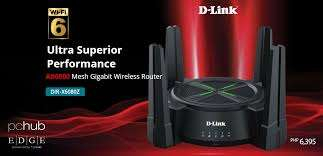
When you walk into a tech shop or browse online for an electronic item, the price gap between home routers and business-grade models can feel quite jarring. A basic home router might cost a few thousand shillings, whilst commercial units easily reach five figures. This difference often raises questions about whether businesses genuinely need these expensive devices or if they’re simply paying for a brand name.
The router price in Kenya varies dramatically based on intended use and capability. Home routers typically range from KES 3,000 to KES 15,000, designed for light browsing and streaming across a handful of devices. Business routers, on the other hand, start around KES 25,000 and can exceed KES 200,000 for enterprise-grade equipment. Understanding what drives this pricing disparity helps businesses make smarter purchasing decisions that protect their operations and investment.
What You’re Actually Paying For
Performance Under Pressure: Business routers handle substantially higher traffic loads without degrading performance. Imagine running a small office with 20 employees, each connecting multiple devices throughout the workday. A home router would buckle under this constant demand, creating frustrating bottlenecks that waste productive hours. Commercial units feature more powerful processors and enhanced memory to maintain consistent speeds even during peak usage periods.
Built-in Security Features: Business-grade routers include advanced firewall protection and security protocols that actively defend against cyber threats. Home devices offer basic security, which might work fine for casual browsing and streaming. Business networks face targeted attacks, phishing attempts, and data breach risks that require professional-grade protection to safeguard sensitive customer information and financial records.
The Hidden Costs of Choosing Cheap
Downtime Equals Lost Revenue: When a home router fails in a business setting, the entire operation grinds to halt. Staff cannot access cloud applications, process payments, or communicate with clients. Even two hours of downtime can cost businesses tens of thousands of shillings in lost productivity and sales. Enterprise routers include redundancy features and failover capabilities that keep operations running even when problems occur.
Support and Warranty Differences: Consumer routers typically come with minimal support and short warranty periods. If something breaks, you’re left troubleshooting on your own or purchasing a replacement. Business equipment includes technical support hotlines, replacement guarantees, and service level agreements that ensure rapid resolution. This support becomes invaluable when network issues threaten critical business functions.
Understanding Network Management Needs
Traffic Prioritisation Capabilities: Business routers use Quality of Service (QoS) settings to prioritise critical applications over less important traffic. Your video conferencing with clients receives priority over background software updates, ensuring smooth communication when it matters most. Home routers lack these sophisticated controls, treating all data equally regardless of importance to your operations.
Remote Management and Monitoring: Commercial-grade equipment allows IT administrators to monitor network performance, identify problems, and make configuration changes remotely. This capability proves essential for businesses with multiple locations or remote workers. Managing a home router typically requires physical access, creating delays and complications when issues arise outside regular business hours.
Scaling Your Network Infrastructure
Growth Accommodation: Business routers support virtual LANs and network segmentation, allowing you to separate guest Wi-Fi from internal systems or create departments with different access levels. As your business expands, these features become necessary rather than optional. Home routers offer fixed functionality that cannot adapt to changing business requirements, forcing premature replacement.
Multiple Connection Handling: Enterprise equipment manages dozens of simultaneous connections without performance degradation. Each connection maintains stable speeds and low latency, which matters tremendously for customer-facing operations. Think about a retail environment processing card payments, managing inventory systems, and supporting staff devices simultaneously. A home router simply wasn’t designed for this multi-tasking intensity.
When Does Your Business Actually Need Commercial-Grade Equipment?
Employee Count and Device Density: Businesses with more than five employees typically benefit from commercial networking gear. Each employee might connect a laptop, smartphone, and perhaps a tablet throughout the workday. Add shared printers, security cameras, and point-of-sale systems, and device counts quickly climb beyond home router capabilities.
Critical Application Dependencies: If your business relies on cloud-based software, VoIP phone systems, or real-time data processing, network reliability becomes non-negotiable. Professional routers provide the stability these applications require to function properly. Dropped connections, lag, or intermittent service create customer frustration and operational chaos that damages your business reputation.
Security and Compliance Requirements: Businesses handling customer data, financial information, or confidential records face regulatory obligations regarding network security. Commercial routers provide the encryption standards, access controls, and audit capabilities needed to meet these compliance requirements. Using consumer equipment in these scenarios creates legal liability and exposes sensitive information to potential breaches.
Making the Right Investment Decision
The question isn’t really whether business routers cost more but rather what you’re getting for that investment. A home router in a commercial setting might save money upfront but creates ongoing costs through downtime, security vulnerabilities, and operational limitations. These hidden expenses quickly exceed the price difference between consumer and business equipment.
Consider your network requirements honestly. Perhaps your startup with three people working on basic tasks can manage with consumer equipment initially. Once you start handling customer data, processing transactions, or supporting more than a handful of devices, the calculation shifts dramatically in favour of business-grade equipment.
Conclusion
Choosing appropriate networking equipment requires looking beyond initial purchase prices to total operational impact. Business routers deliver reliability, security, and performance that protect your operations and support growth. The price premium reflects genuine capabilities that prevent costly disruptions and security incidents. Take time to assess your current needs and future plans before making this critical infrastructure decision. Speak with IT professionals who understand Kenyan business environments to identify equipment that matches your specific requirements and budget constraints.